
Hamilton County Civil Docket Searches
Start at the Hamilton County Clerk Records Search. It splits civil records into Common Pleas Civil and Municipal Civil. Pick the division before anything else. From there you can search by last name, first name, or company name. Add optional dates if a name returns too many cases. Already have the case number? Choose the division and use the case-number route instead. Getting the division right beats running one broad, all-courts query every time.
The Clerk's menu goes deeper than a simple name lookup. Separate routes exist for foreclosure, parcel or address, lien and certified-judgment, case-cost, and municipal civil garnishment records. The Common Pleas Civil and Municipal Civil classifications get their own paths too. Pick a route once you know the record type. A Hamilton County civil docket entry can surface through more than one path. The case history stays the real chronology of the matter.
- Open Records Search and choose Common Pleas Civil or Municipal Civil.
- Enter the party name or company name, or select the division on a known-number search.
- Open the matching case summary and case history to check the caption, division, and dates.
- Use the schedule route for a current court date and request a specific document if the online image is unavailable.
Hamilton Civil Jurisdiction Split
Hamilton County splits its civil courts cleanly. Matters over $15,000 belong to the Court of Common Pleas, General Division. Civil matters below $15,000 go to Hamilton County Municipal Court. The dollar figure is a general description of jurisdiction. It is not a rule for your own claim. For docket searching, it explains why the Clerk filter you choose matters so much.
| Hamilton civil venue | General case range | Clerk search division |
|---|---|---|
| Common Pleas, General Division | Civil matters over $15,000 | Common Pleas Civil |
| Municipal Court | Civil matters below $15,000 | Municipal Civil |
| Domestic Relations or Probate | Separate court path | Domestic Relations filter or Probate search |
Two more offices sit outside that split. Domestic Relations appears as its own Clerk filter, and Probate maintains a separate public record search. So a miss in either system does not mean the Hamilton County civil docket search itself failed.
Civil Dockets: What They Show
A Hamilton County civil docket works in two parts. The case summary identifies the record. The case history then lists public events in date order: a complaint or petition, service activity, a response, motions, orders, hearings, judgments, and post-judgment entries. Depending on what is public, it may also list counsel, document indicators, costs, or certificate-of-judgment references.
| Case reference | Case number, civil division, judge, filing date, classification, and public caption or party roles. |
|---|---|
| Opening events | Complaint or petition, service-related entries, and a response where filed. |
| Case activity | Motion, case-management, hearing, order, and judgment entries in chronological sequence. |
| History controls | Optional date range and ascending or descending docket-entry order on the case-history route. |
| Documents | A linked-image indicator where available, not a guarantee that every filed document can be opened remotely. |
A missing image proves nothing about whether the document exists. Keep the case number and entry date, then ask the clerk for the record through its request process.
Hamilton Civil History Controls
The Clerk's Case Number Searching screen lets you set a beginning and ending date and choose ascending or descending order for the docket entries. Those controls matter. They can separate the opening of a civil matter from the later collection, certificate, appeal, or judgment activity that piles on afterward. They also stop you from reading the first visible line as the newest event in the case history.
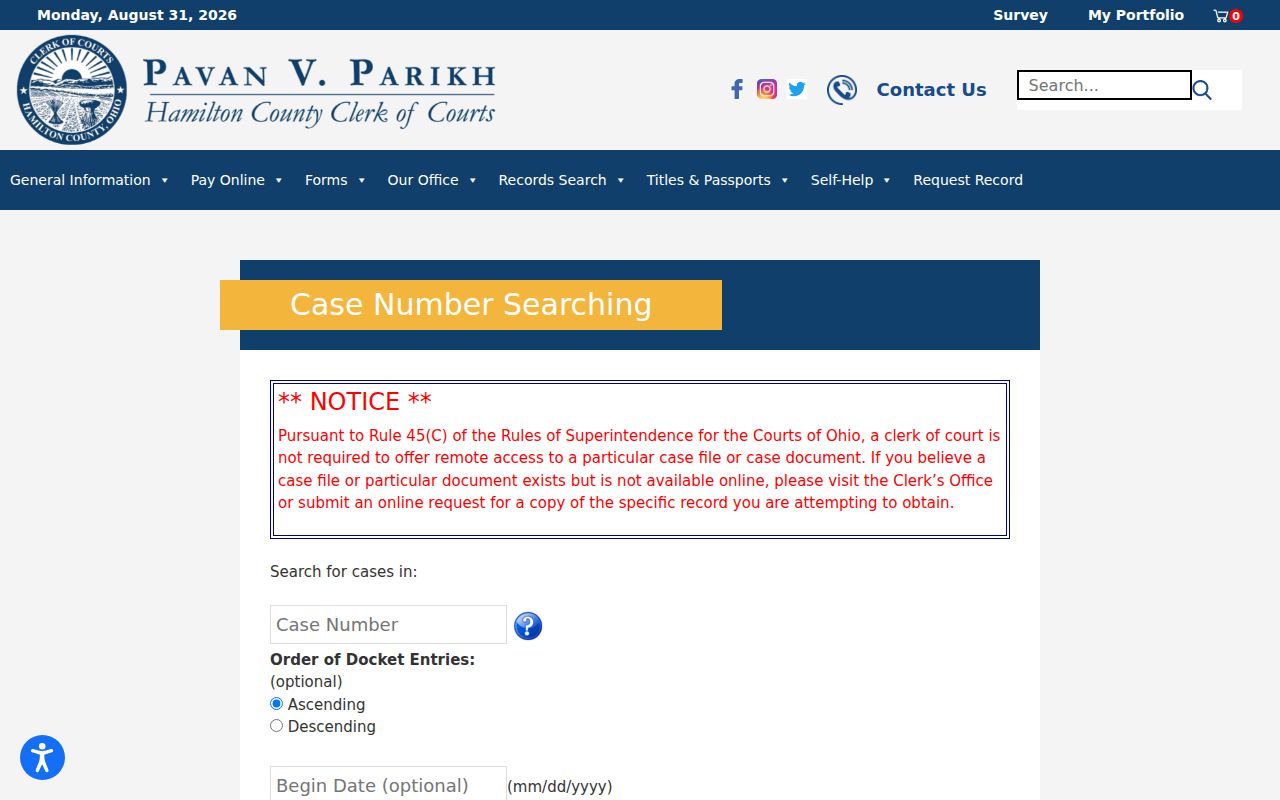
The official interface supports one record at a time. It cannot confirm a live hearing date. A case history keeps prior notices and former settings long after they pass.
Anyone still hunting for the case itself can use the county Docket Search page. It walks through the name and case-number routes that lead to a Hamilton County civil docket record before the history controls come into play.
What Cases Fill the Civil Docket
Several record families fill the Hamilton County civil docket. Higher-value litigation routes to Common Pleas Civil. Lower-value civil cases head to Municipal Civil. Beyond those two, the Clerk's search menu covers classifications, foreclosures, liens and certified judgments, case-cost statements, and municipal civil garnishments. Using these named county routes beats treating every civil matter as one broad case type.
- Common Pleas civil litigation and related judgment activity
- Municipal civil matters and small-claims categories
- Foreclosure, parcel or address, and lien or certified-judgment searches
- Municipal civil garnishment and case-cost reference routes
- Separate Domestic Relations and Probate court record paths
Remember that a search category just routes the query. It decides nothing about the merits or status of a case. Open the case history and confirm the division before relying on the record.
Hamilton Civil Case Prefixes
The Clerk's document-request form doubles as a decoder for Hamilton County civil case families. The prefix A marks Common Pleas Civil. CV marks Municipal Civil. CJ points to certified-judgment structures, and EX flags execution. A prefix steers you toward the right checkbox. The case page itself still has to confirm the court and record type.
- Case summary
- The header or overview for one Hamilton County case.
- Case history
- The dated list of filings and court events, also called a docket or register of actions.
- Certified copy
- A Clerk-certified record requested through the applicable division, not a plain online docket display.
- Exemplification
- A separately handled authenticated copy type listed on the Municipal Civil fee schedule.
Note: Prefixes narrow a search. They never replace checking the division, caption, and entry dates in the record you get back.
Hearings on the Civil Docket
A civil history can hold a notice of hearing, a case-management event, a motion setting, an order, or a judgment entry. None of that settles the current court date. For that, Hamilton County offers schedule searches. You can search by case number, public parties, attorney, or court and judge. When an old docket entry and a current setting seem to clash, trust the current schedule plus the assigned court. That pairing is the best confirmation chain.
Need a person instead of a screen? Common Pleas Civil case information sits at the Room 315 counter, 1000 Main Street, 513-946-5638. Municipal Civil answers at Room 115, 1000 Main Street, 513-946-5700. The Courthouse kiosks list the next seven days of Municipal and Common Pleas criminal and civil schedules too. Calling the right division keeps a civil date from landing with the wrong office.
Hamilton Civil Setting Confirmation
A civil setting can shift even after a notice lands in the case history. Have a case number ready. Then pull the current court-date schedule first. When the online calendar leaves the question open, confirm the division first. Then call the right clerk, Assignment office, or courtroom. An old docket line and the court can disagree. The official hearing information from the court wins. The docket records what happened; the court records what will happen.
Hamilton County also runs seven-day kiosks for Municipal and Common Pleas schedules, no login needed. You will find them near the main-entrance elevators and outside Room 255 at the Courthouse. Their brief seven-day window suits a quick confirmation. That window works far better than a full case-history search for an upcoming hearing.
Who Can See Civil Dockets
Hamilton County civil dockers are public court records, but access still follows state rules. Two sources govern what a visitor may see. The Ohio Rules of Superintendence set the framework for court-record access, while the Ohio Public Records Act covers public records and their exemptions. One limit matters here. Sup.R. 45(C) does not require remote access to every court record or document, so a public docket entry and remote document access are not the same thing.
Practical access rule: If a public case history identifies a filing without an image, use the case number, document description, and entry date to make a focused request to the Clerk.
Not every document in a Hamilton County civil case shows up like an ordinary public record. Sealed or restricted material may be absent from a docket search result entirely. If something seems missing, do not guess the cause from the search result alone.
Hamilton Civil Document Requests
The Clerk’s record-request instructions ask for enough detail to locate the right filing. The document form accepts a case number, caption, document type, date filed or entered. Other identifying detail helps too. Pickup, U.S. mail, or email delivery can be selected when allowed. The form’s payment and envelope instructions apply to mail requests.
Fees differ by division. Municipal Civil lists $0.10 plain copies, $1 per-page certified copies, and $30 exemplified copies. Other divisions use different schedules, so confirm the current fee before sending payment. Old or microfilm files can also take longer to pull.
Know what you are asking for. A public case history is only a chronology of docket lines. A certified copy is a Clerk-authenticated paper record. Someone who needs the actual filed judgment, order, or certificate should request that identified item by name. Never trust the wording of its docket line. The form separates a document request from a lookup. A clear description, an exact date, and the Hamilton County civil case number all help when one file holds several similar entries.
For a present hearing rather than a past filing, turn instead to the calendar, court, and assignment channels. Hamilton County’s civil record paths are local and division-specific. A precise request gives the Clerk everything needed. Make it after the right docket entry is found, and the Clerk can deliver the correct document.